Geekzone: technology news, blogs, forums
Guest
Welcome Guest.
You haven't logged in yet. If you don't have an account you can register now.


D1023319

527 posts

Ultimate Geek
+1 received by user: 90

ID Verified

#298962 30-Jul-2022 13:43
Send private message

Hi


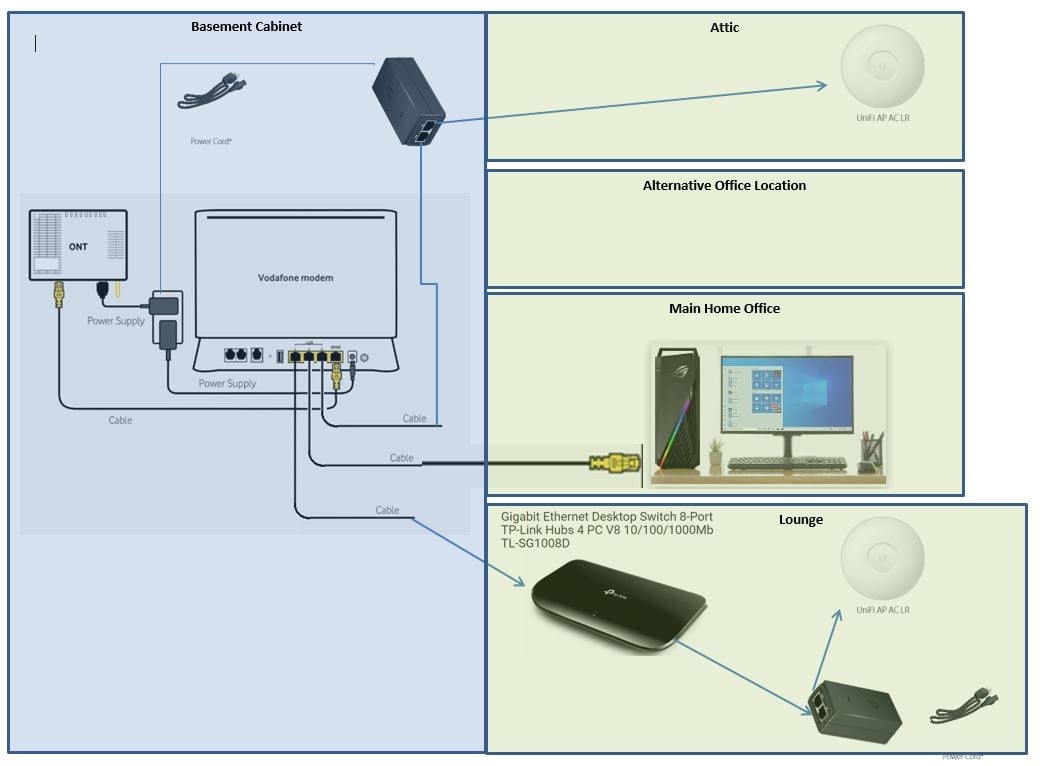
I have a Vodafone ultra hub and two Ubiquity UAP-AC-LR access points running as a mesh.


I also run wired connections to office and lounge where i have a TP Link switch to connect to all the devices there, tv, xbox, etc 


My problem is I need another wired connection to my alternative office location but the VF Utra hub has no spare ports.
I may even add a third Access Point


I am wondering whether to loop back from the TP switch as that has a spare port or is there a smarter layout, e.g. big switch located near router??


Cheers


Create new topic
shk292
2916 posts

Uber Geek
+1 received by user: 2040

Lifetime subscriber

  #2948322 30-Jul-2022 13:49
Send private message

You just need another switch next to your router.  No point messing around with loopbacks given switches are so cheap


waikariboy
958 posts

Ultimate Geek
+1 received by user: 101

ID Verified
Trusted

  #2948324 30-Jul-2022 13:53
Send private message

buy a unifi poe switch place it next to modem, plug all network cables into that and one cable into the modem. this will clean up the need for 1x poe ejector.


Balm its gone!


froob
698 posts

Ultimate Geek
+1 received by user: 233

Lifetime subscriber

  #2948325 30-Jul-2022 13:55
Send private message

I agree with the comment above from shk292, but yes you could also feed one of the ports back from the TP-Link switch in the lounge, assuming you have a second cable running to that location. You would then patch that second cable directly to the cable to the alternative office location. Assuming the run is not too long overall, it should all work.


D1023319

527 posts

Ultimate Geek
+1 received by user: 90

ID Verified

  #2948423 30-Jul-2022 17:36
Send private message

waikariboy:


buy a unifi poe switch place it next to modem, plug all network cables into that and one cable into the modem. this will clean up the need for 1x poe ejector.


Thanks for comments


If I bought a product like


Ubiquiti UniFi Switch USW-Flex-Mini 5-Port Managed Gigabit Ethernet Switch with USB-C Power Adapter to put by the router - 


https://www.pbtech.co.nz/product/SWHUBI1105/Ubiquiti-UniFi-Switch-USW-Flex-Mini-5-Port-Managed#product-features-anchor
 
would this mean the Access Points would not longer need their own POE with its associated power plug?
i.e. the Access point would just connect straight to the switch via the ethernet cable?


froob
698 posts

Ultimate Geek
+1 received by user: 233

Lifetime subscriber

  #2948427 30-Jul-2022 17:44
Send private message

Not with that switch - the Unifi Flex Mini can be powered by PoE, but can’t power other devices.

You would need a switch that can supply power over ethernet, like this one for example: https://www.pbtech.co.nz/product/SWHTPL1001/TP-Link-TL-SG108PE-8-Port-Gigabit-Easy-Smart-PoE-S

Edit: Also, only if the WiFi APs are directly connected to that switch - and not through another switch like your one in the lounge.


D1023319

527 posts

Ultimate Geek
+1 received by user: 90

ID Verified

  #2948439 30-Jul-2022 18:30
Send private message

froob: Not with that switch - the Unifi Flex Mini can be powered by PoE, but can’t power other devices.

You would need a switch that can supply power over ethernet, like this one for example: https://www.pbtech.co.nz/product/SWHTPL1001/TP-Link-TL-SG108PE-8-Port-Gigabit-Easy-Smart-PoE-S

Edit: Also, only if the WiFi APs are directly connected to that switch - and not through another switch like your one in the lounge.


Thanks - that looks good what i am after.

Can you recommend a Ubquity equivalent?
I am just thinking management compatibility?


Shop now for Dell laptops and other devices (affiliate link).
michaelmurfy
meow
13580 posts

Uber Geek
+1 received by user: 10910

Moderator
ID Verified
Trusted
Lifetime subscriber

  #2948445 30-Jul-2022 18:56
Send private message

Keep it simple...


https://www.pbtech.co.nz/product/SWHTPL1010/TP-Link-TL-SG1008D-8-Port-Gigabit-Unmanaged-Switch


You don't need a managed switch or even a PoE switch... Just grab this and hook it up to the Vodafone router.


Also considering you're on Vodafone why not opt for their SuperWiFi package? The mesh system they provide can run via Ethernet and is a bit better than the Ubiquiti solution you have.


Michael Murphy | https://murfy.nz
Referral Links: Quic Broadband (use R122101E7CV7Q for free setup)

Are you happy with what you get from Geekzone? Please consider supporting us by subscribing.
Opinions are my own and not the views of my employer.


froob
698 posts

Ultimate Geek
+1 received by user: 233

Lifetime subscriber

  #2948447 30-Jul-2022 19:08
Send private message

Can you recommend a Ubquity equivalent?
I am just thinking management compatibility?


This is the equivalent Unifi switch, but I think it's out of stock in most places: https://store.ui.com/collections/unifi-network-switching/products/unifi-switch-lite-8-poe

There's also this older model: https://store.ui.com/collections/unifi-network-switching/products/unifi-switch-8-60w


linw
2893 posts

Uber Geek
+1 received by user: 1205


  #2948448 30-Jul-2022 19:13
Send private message

And cheap...


D1023319

527 posts

Ultimate Geek
+1 received by user: 90

ID Verified

  #2948467 30-Jul-2022 21:14
Send private message

michaelmurfy:


Keep it simple...


https://www.pbtech.co.nz/product/SWHTPL1010/TP-Link-TL-SG1008D-8-Port-Gigabit-Unmanaged-Switch


You don't need a managed switch or even a PoE switch... Just grab this and hook it up to the Vodafone router.


Also considering you're on Vodafone why not opt for their SuperWiFi package? The mesh system they provide can run via Ethernet and is a bit better than the Ubiquiti solution you have.


Thats a good question for which i have no rationale or technical answer.


  1. I dont know why but when working from home - my work laptop keeps pinging me with connection notifications when I am on a strong wifi signal but seems ok when wired.

  2. Historically i hard wired devices that were in a fixed location (not that applies anymore)

  3. my house previously had lots of weak wifi spots and i liked the idea of Access points spread through the attic out of sight 


D1023319

527 posts

Ultimate Geek
+1 received by user: 90

ID Verified

  #2948468 30-Jul-2022 21:18
Send private message

michaelmurfy:


Keep it simple...


https://www.pbtech.co.nz/product/SWHTPL1010/TP-Link-TL-SG1008D-8-Port-Gigabit-Unmanaged-Switch


If I did use this - can i connect the Access Points direct to this without the need to use the individual POE power bricks???


Shop now on Samsung phones, tablets, TVs and more (affiliate link).
Jase2985
13732 posts

Uber Geek
+1 received by user: 6205

ID Verified
Lifetime subscriber

  #2948470 30-Jul-2022 21:33
Send private message

D1023319:


michaelmurfy:


Keep it simple...


https://www.pbtech.co.nz/product/SWHTPL1010/TP-Link-TL-SG1008D-8-Port-Gigabit-Unmanaged-Switch


If I did use this - can i connect the Access Points direct to this without the need to use the individual POE power bricks???


no its not a POE switch


for the 1 AP its not worth it unless you are out of power points


Create new topic


Geekzone Live »

Try automatic live updates from Geekzone directly in your browser, without refreshing the page, with Geekzone Live now.


Are you subscribed to our RSS feed? You can download the latest headlines and summaries from our stories directly to your computer or smartphone by using a feed reader.