Geekzone: technology news, blogs, forums
Guest
Welcome Guest.
You haven't logged in yet. If you don't have an account you can register now.


Killerkiwi2005

374 posts

Ultimate Geek
+1 received by user: 85

Trusted

#302541 30-Nov-2022 13:34
Send private message

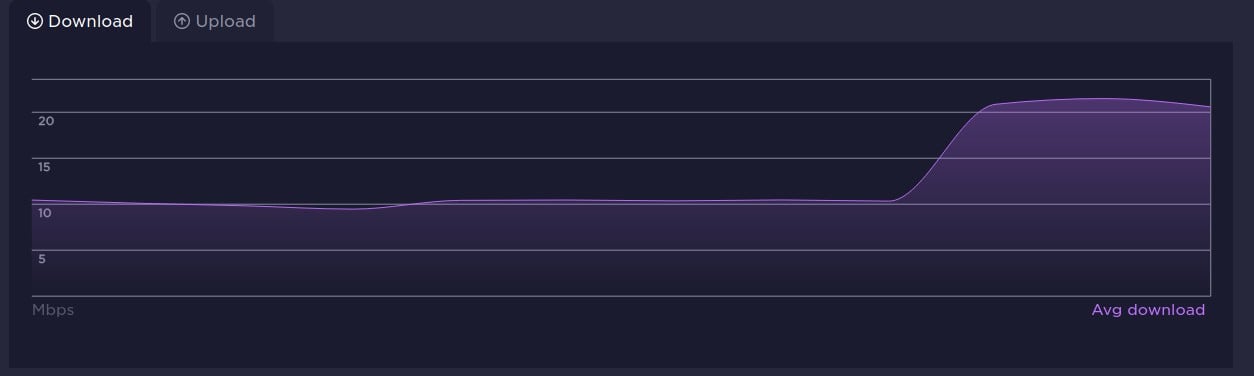
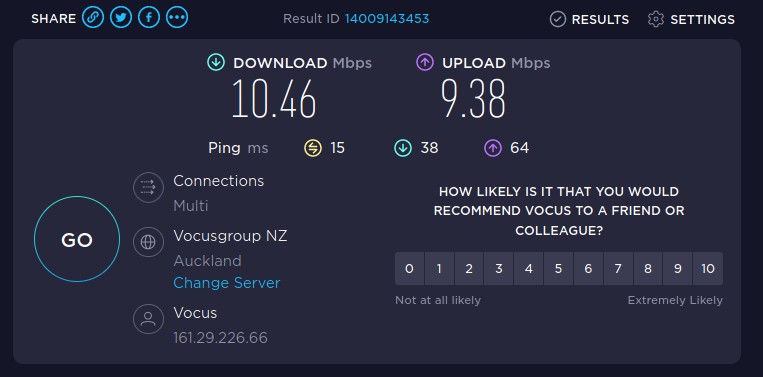
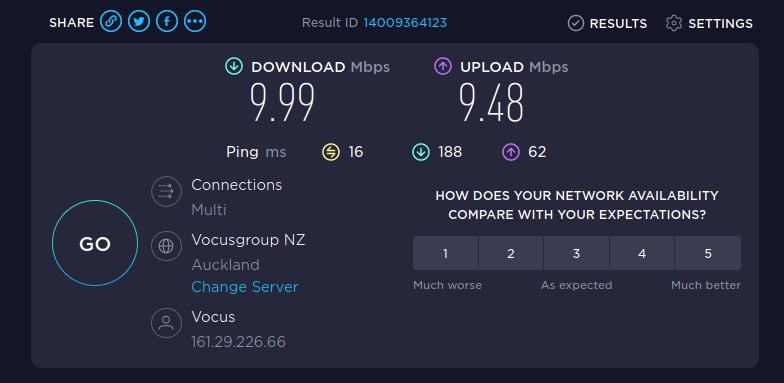
switched to 2degree vdsl 3 days ago, speed dropped from 40mb down to 10mb, can not get through to helpdesk, email is unanswered, not sure what to do at this point just stop paying?


Things already tried


  • turned modem off and on
  • factory reset new modem
  • old spark modem

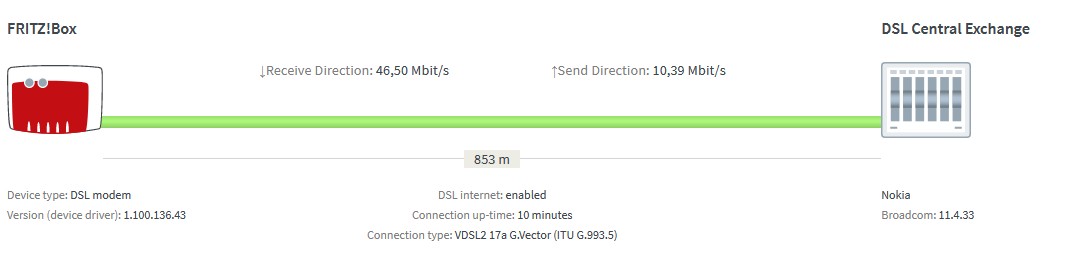
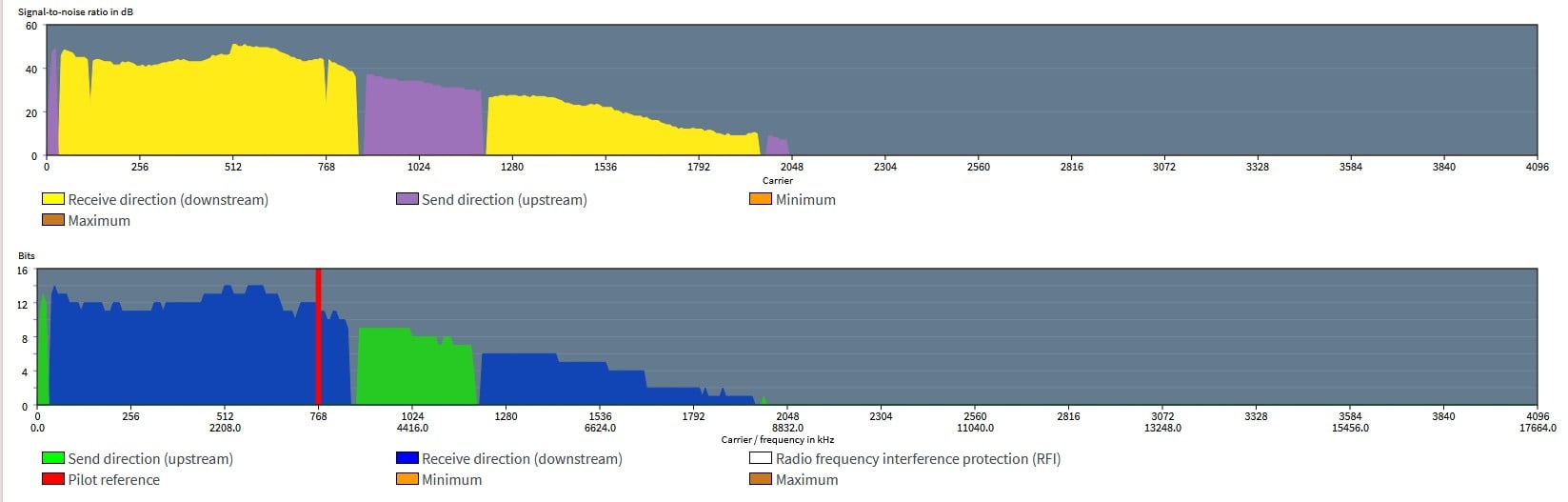
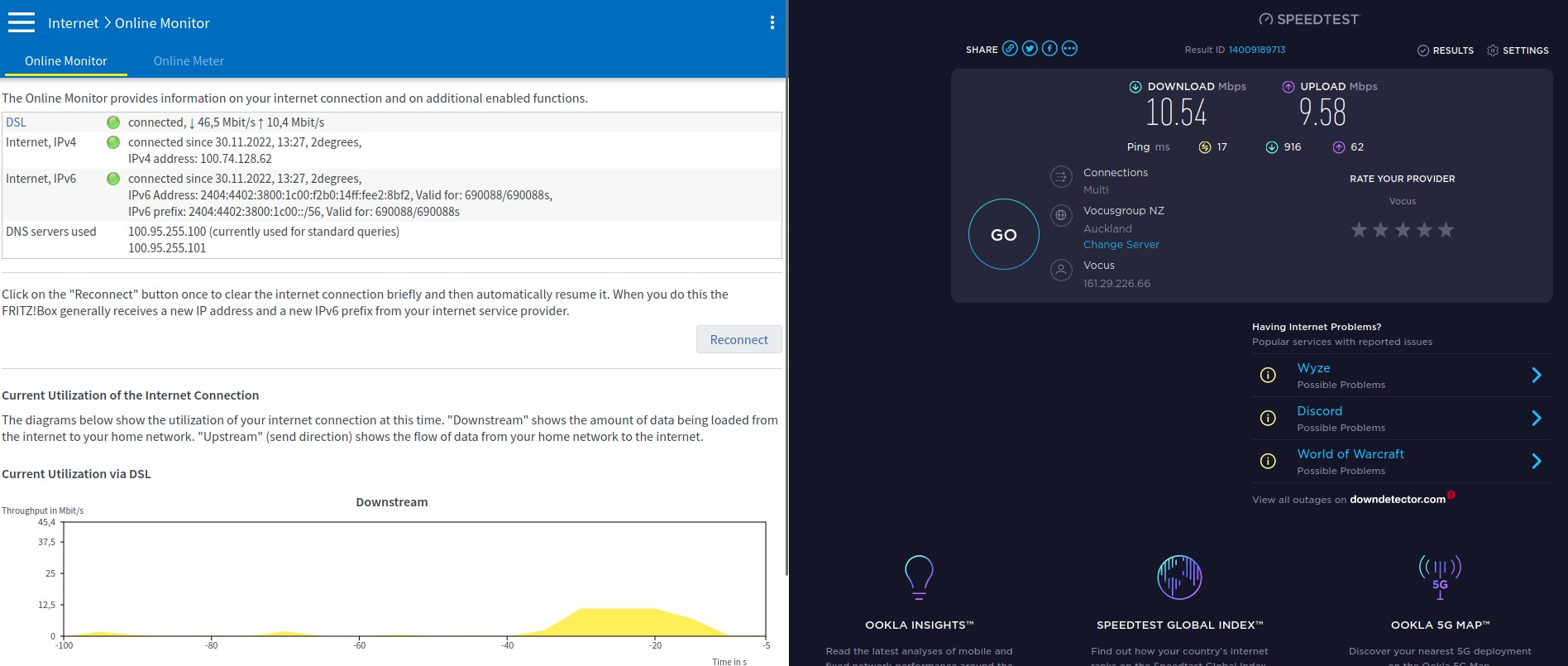
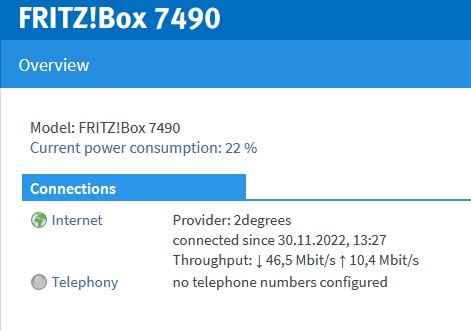
Speed test is via Ethernet cable straight to modem, nothing else connected, you can see the vdsl is connected at 46.5 down, which ~ what we got via spark


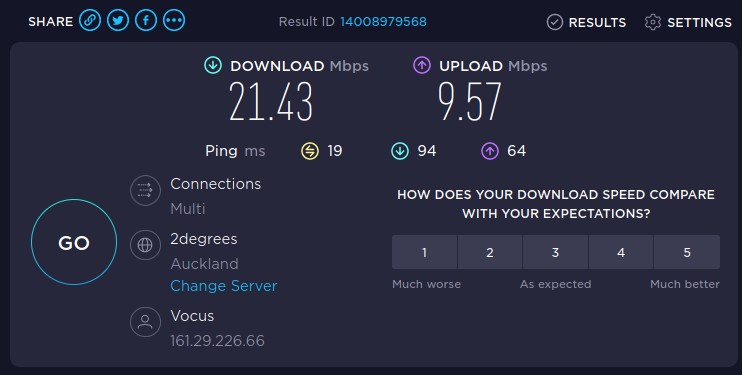
speed test


Filter this topic showing only the reply marked as answer View this topic in a long page with up to 500 replies per page Create new topic
 1 | 2 | 3
Killerkiwi2005

374 posts

Ultimate Geek
+1 received by user: 85

Trusted

  #3003622 30-Nov-2022 13:37
Send private message

more info


wratterus
1687 posts

Uber Geek
+1 received by user: 678


  #3003623 30-Nov-2022 13:40
Send private message

OK - that is a little odd. Your line speed does look to still be fine, but not throughput as you mention. Assume you have tested with multiple devices & over ethernet & WiFi & seen the same results?


If you test to a 2D server, is it the same also? You definitley sure your device is negotiating Gigabit to the modem?


Killerkiwi2005

374 posts

Ultimate Geek
+1 received by user: 85

Trusted

  #3003626 30-Nov-2022 13:51
Send private message

[s]

wratterus:


OK - that is a little odd. Your line speed does look to still be fine, but not throughput as you mention. Assume you have tested with multiple devices & over ethernet & WiFi & seen the same results?


If you test to a 2D server, is it the same also? You definitley sure your device is negotiating Gigabit to the modem?


Yeah all devices are running slow, thats why I tried unplugging everything, I assumed it was the modem, but the old modem gives the same result, 


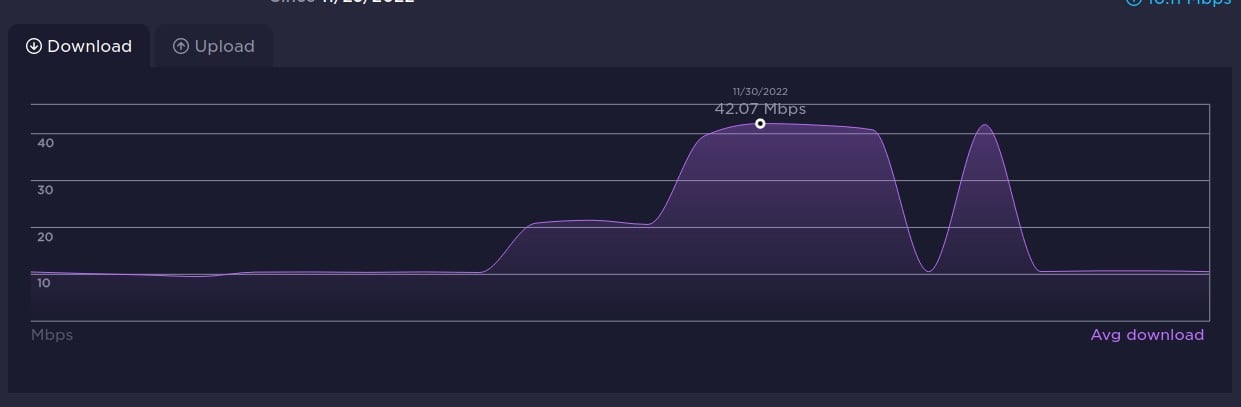
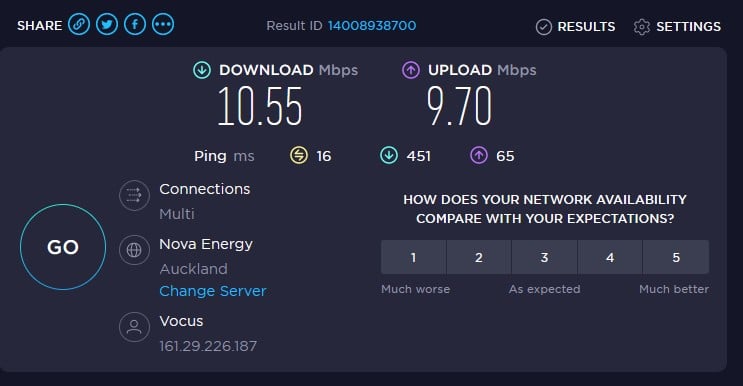
this looks suspicious... it really looks like a 2degree networking issue


you can see the 2 degree server switch

[/s]


wratterus
1687 posts

Uber Geek
+1 received by user: 678


  #3003638 30-Nov-2022 14:18
Send private message

Really can't tell you what might have gone on there. Odd one. 


Killerkiwi2005

374 posts

Ultimate Geek
+1 received by user: 85

Trusted

  #3003644 30-Nov-2022 14:58
Send private message

And its gone again, must be an upstream issue some where...


Linux
12173 posts

Uber Geek
+1 received by user: 8469

Trusted
Lifetime subscriber

  #3003646 30-Nov-2022 15:03
Send private message

DLM kicking in? Do not repower the modem


Shop now for Dell laptops and other devices (affiliate link).
cyril7
9073 posts

Uber Geek
+1 received by user: 2499

ID Verified
Trusted
Subscriber

  #3003648 30-Nov-2022 15:05
Send private message

Linux:


DLM kicking in? Do not repower the modem


Yep, thats my bet, changed provider, which forced a line card reset, and DLM does a dance.


Cyril


Killerkiwi2005

374 posts

Ultimate Geek
+1 received by user: 85

Trusted

  #3003651 30-Nov-2022 15:12
Send private message

So I should just wait, how long should it take for it to kick in correctly ?


wratterus
1687 posts

Uber Geek
+1 received by user: 678


  #3003652 30-Nov-2022 15:14
Send private message

Would ddDLM not drop the line speed? That is a pretty significant change. 


OP - can you 100% confirm the line speed is showing as 46/10 when the slow throuhput issue is occuring?


Killerkiwi2005

374 posts

Ultimate Geek
+1 received by user: 85

Trusted

  #3003653 30-Nov-2022 15:17
Send private message

wratterus:


Would ddDLM not drop the line speed? That is a pretty significant change. 


OP - can you 100% confirm the line speed is showing as 46/10 when the slow throuhput issue is occuring?


Linux
12173 posts

Uber Geek
+1 received by user: 8469

Trusted
Lifetime subscriber

  #3003654 30-Nov-2022 15:20
Send private message

Killerkiwi2005:


So I should just wait, how long should it take for it to kick in correctly ?


@Killerkiwi2005 If you keep power cycling the modem DLM thinks line is unstable and lowers the speed


Shop now on AliExpress (affiliate link).
Killerkiwi2005

374 posts

Ultimate Geek
+1 received by user: 85

Trusted

  #3003656 30-Nov-2022 15:25
Send private message

Linux:


Killerkiwi2005:


So I should just wait, how long should it take for it to kick in correctly ?


@Killerkiwi2005 If you keep power cycling the modem DLM thinks line is unstable and lowers the speed


But the connection speed is still 46mb ?  I had left it on for 2 days before trying to trouble shoot this


yitz
2238 posts

Uber Geek
+1 received by user: 594


  #3003669 30-Nov-2022 16:18
Send private message

You might be better off testing to Vocus or another known good NZ server rather than 2degrees servers as logically your IP originates in Vocus NZ AS 9790 network space. In the past there have been traffic congestion issues on the Vocus-2degrees interconnect.


Killerkiwi2005

374 posts

Ultimate Geek
+1 received by user: 85

Trusted

  #3003721 30-Nov-2022 16:35
Send private message


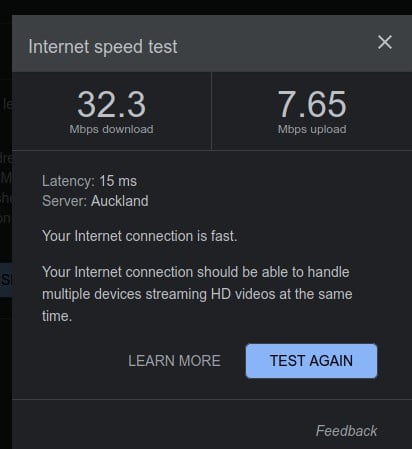
Vocus


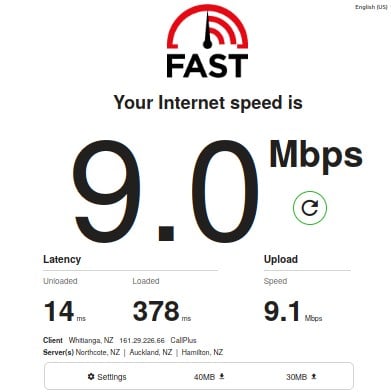
fast.com / netflix


google speed test!


its really noticeable trying to git push/pull to bitbucket etc


RunningMan
9184 posts

Uber Geek
+1 received by user: 4833


  #3003722 30-Nov-2022 16:37
Send private message

Doesn't look like DLM to me. D/S sync rate clearly showing at about 46Mb/s in the 2 screenshots yet throughput only around 10Mb/s. if this was DLM then the throughput would be proportional to the sync rate, but it isn't.


Don't reboot the modem repeatedly though or DLM will kick in because it thinks the line is unstable and drag the sync rate down for a while.


Certain there's nothing else on the connection using bandwidth? (either up or down).


 1 | 2 | 3
Filter this topic showing only the reply marked as answer View this topic in a long page with up to 500 replies per page Create new topic


Geekzone Live »

Try automatic live updates from Geekzone directly in your browser, without refreshing the page, with Geekzone Live now.


Are you subscribed to our RSS feed? You can download the latest headlines and summaries from our stories directly to your computer or smartphone by using a feed reader.